.webp)





A AI-ready website is a website that AI systems like ChatGPT, Perplexity, and Google AI Overviews can technically access, understand in terms of content, and cite as a source. This requires four things: crawlers must be allowed and able to read your pages, content must be clearly structured, facts must be machine-readable, and your brand must be recognizable as a trustworthy entity.
Good Google rankings only cover part of this. For our own GEO checklist at Friendventure, we’ve compiled 40 checkpoints across five areas of action. The technical aspects - everything directly related to the website - are covered in this article. You’ll get a checklist here that you can use to audit your own website and pass tasks directly to your IT team or agency.
What "AI-ready" really means for a website
AI-ready means your website is used as a source in AI responses. Traditional SEO ensures you rank in a list of search results. An AI-ready website ensures that ChatGPT or Perplexity can read your content, categorize it correctly, and incorporate it into their answers.
There are two names for this discipline. Generative Engine Optimization (GEO) refers to optimization for systems that formulate their own answers. The bakedwith glossary entry provides a good overview of Generative Engine Optimization (GEO). Answer Engine Optimization (AEO) describes almost the same thing with a focus on answer engines. For your website, the difference is secondary, as the technical foundations are identical.
The following table shows where the two approaches differ:
GEO builds on SEO. A technically flawed website won't achieve AI visibility either.
Why AI visibility will determine your leads in 2026
In B2B purchasing, research is increasingly starting in AI chats, and if you aren't there, you won't make the shortlist. At the same time, traffic from AI answers generates an above-average number of inquiries. Together, these factors make AI visibility a key sales priority.
Two figures point the way. For the "The Answer Economy" report by G2 , over 1,000 B2B software buyers were surveyed in March 2026. 51 percent of them now start their research in an AI chatbot more often than on Google. And a study by Semrush covering more than 500 digital marketing and SEO topics found that, in terms of conversion rate, a visit from an AI search is on average 4.4 times more valuable than a visit from traditional organic search.
People arriving via an AI answer have already had the market filtered for them and are clicking with intent. For your website, this means that a few visits from ChatGPT or Perplexity can be worth more than many from Google search.
A top ranking only offers limited protection here. While AI systems often rely on search indices, they select their sources based on their own criteria. A page ranked #2 on Google might be missing from an AI answer if its core message is buried in the fifth paragraph or if the crawler isn't allowed to access it.
How AI search engines read your website
AI systems use your website in two ways: as training material and as a live source for current answers. Providers send out their own crawlers for both, and most of them do not execute JavaScript. If it isn't in the delivered HTML, it doesn't exist for them.
Training data is the text from which a language model learns its foundational knowledge. What ends up there about your brand shapes its answers in the long term, but is difficult to change in the short term. The bakedwith article on Large Language Models explains exactly how this works..
Live retrieval is usually more important for your visibility. When someone asks ChatGPT or Perplexity about providers, the system searches for relevant pages in real time, reads them, and builds an answer from them. Experts call this Retrieval Augmented Generation (RAG) - an answer enriched with freshly retrieved sources. We are building this principle directly into websites as a semantic search across pages, PDFs, and FAQs. You quickly learn that the model only answers as well as the content is structured. The same applies to ChatGPT and Perplexity.
The major providers now clearly separate these tasks by crawler:
This separation is crucial for your robots.txt; more on that in the checklist below.
The second topic is JavaScript. Googlebot has been rendering JavaScript for years, but as far as we know, most AI crawlers do not. If your website assembles its content in the browser -like some single-page applications or product configurators - an AI crawler will likely see an almost empty page. We currently consider this the most underestimated reason why technically modern websites are missing from AI answers.
Classic CMS platforms like WordPress or TYPO3 deliver pages as finished HTML by default, giving them an advantage here. With headless setups, such as those using Storyblok or Contentful with a JavaScript frontend, server-side rendering must be planned for intentionally. We implement both variants and therefore address this question at the very beginning of headless projects, not just shortly before launch.
An example from our work: For the energy provider Mark-E, we implemented the website using Storyblok as a headless CMS, including an interactive tariff calculator. A calculator like this requires JavaScript - that’s unavoidable. It is all the more important that the surrounding information is provided as plain text on the page: tariff types, price guarantees, bonuses, and frequently asked questions. These are exactly the passages an AI can cite later, whereas it cannot cite the calculator itself.
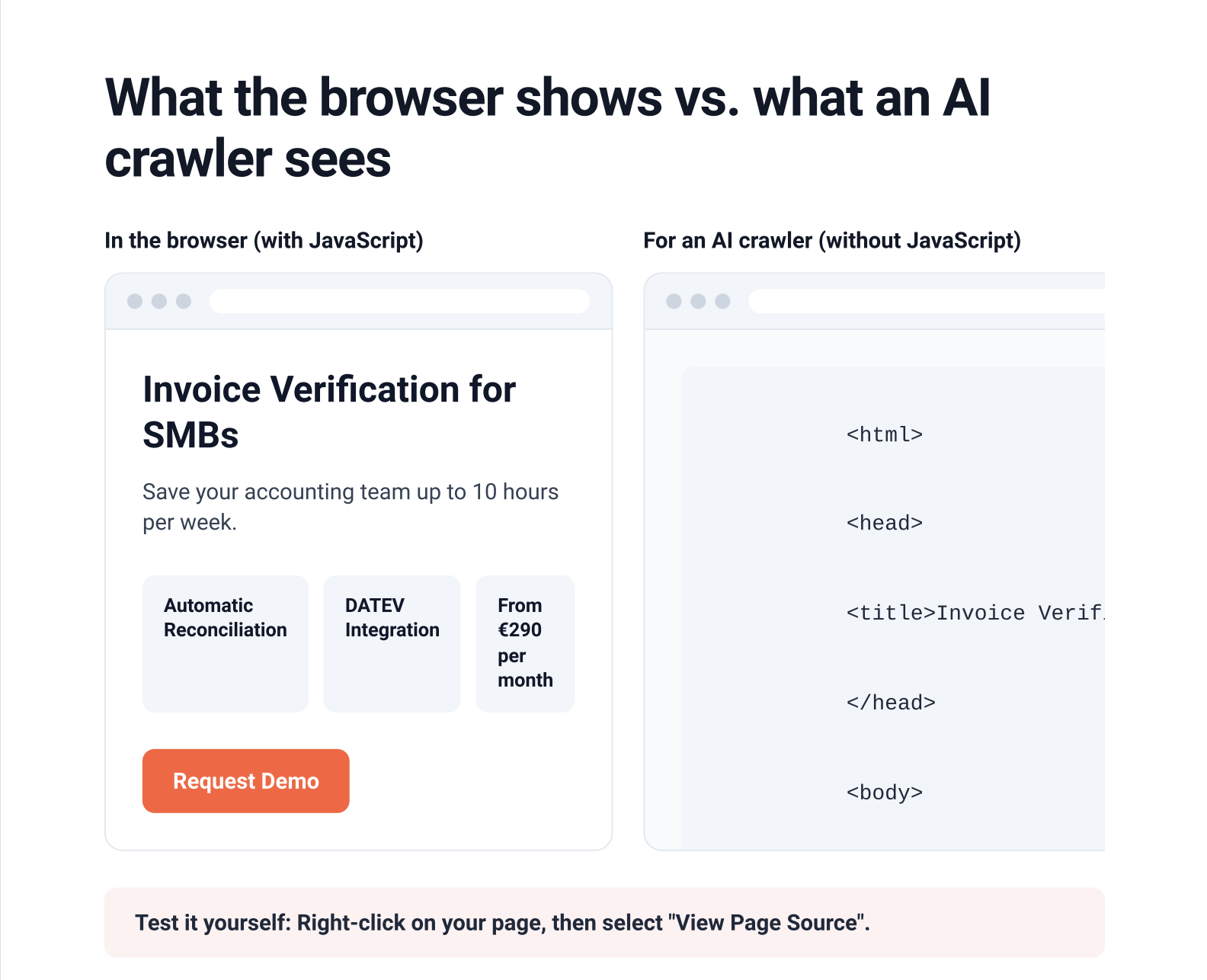
The technical AI-ready checklist for 2026
The checklist covers five areas: accessibility, structure, structured data, llms.txt, and trust and entities. Each point includes what needs to be done, why it matters for AI visibility, and how to verify it. This allows you to hand off every line directly as a task to your IT team or agency.
The order is intentional. For the AI-ready websiteswe build at Friendventure, we follow this exact sequence because each step builds on the one before it.
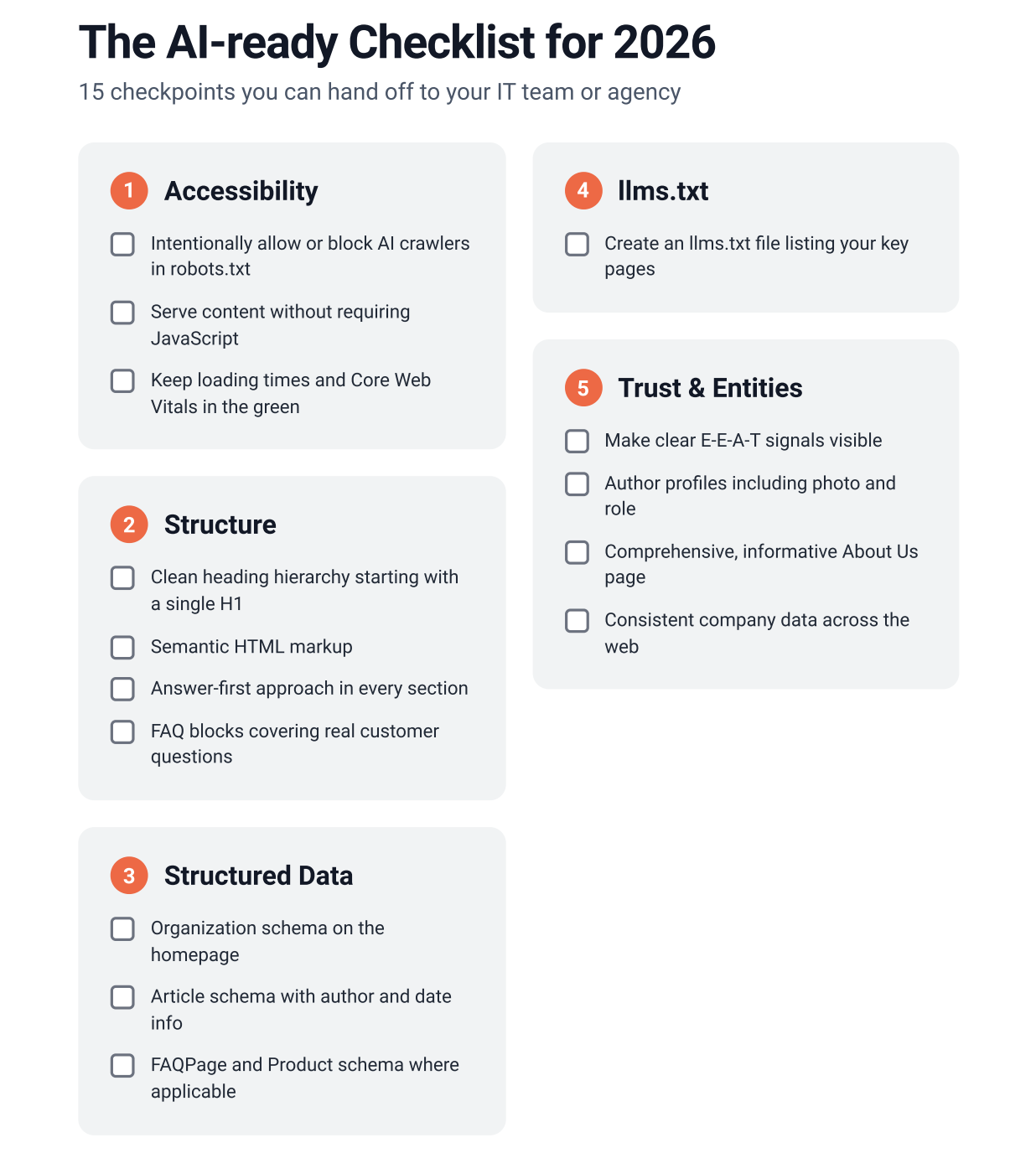
Accessibility: robots.txt, rendering, Core Web Vitals
Without access, everything else is pointless. These three factors determine whether AI crawlers can even see your content in the first place.
A sensible default setting for most B2B websites is: allow search crawlers, but decide for yourself regarding training.
User-agent: OAI-SearchBot
Allow: /
User-agent: Claude-SearchBot
Allow: /
User-agent: PerplexityBot
Allow: /
# Training: make an informed choice
User-agent: GPTBot
Allow: /
Structure: Headings, semantic HTML, answer-first, FAQ
AI systems cite individual passages, not entire pages. The more clearly a passage works on its own, the more likely it is to be used. By the way, this article follows that very principle: every section starts with the answer, and the details follow after.
Structured data: Schema.org (Organization, FAQPage, Article)
Structured data provides AI systems with facts in a machine-readable format: who you are, how much a product costs, and who wrote an article. The vocabulary for this comes from schema.org and is embedded into the source code as JSON-LD.
Here is what a lean Organization markup for the homepage looks like. Replace the name, address, and profiles with your own details:
<script type="application/ld+json">
{
"@context": "https://schema.org",
"@type": "Organization",
"name": "Beispiel GmbH",
"url": "https://www.beispiel.de",
"logo": "https://www.beispiel.de/logo.png",
"address": {
"@type": "PostalAddress",
"addressLocality": "Cologne",
"addressCountry": "DE"
},
"sameAs": [
"https://www.linkedin.com/company/beispiel-gmbh"
]
}
</script>
llms.txt: an honest assessment
The llms.txt is a text file in your website's root directory that provides AI systems with a curated overview of your most important content. It's useful, but it's not a magic bullet for more visibility. As of now, none of the major providers have officially confirmed that they use the file for search results.
Our take: Go ahead and set it up, since it only takes an hour and some AI agents and developer tools are already reading it. Just don't expect it to impact your mentions in ChatGPT. You can find out how the file is structured in the llms.txt specification.
Trust and entities: E-E-A-T, author profiles, and consistent data
AI systems recommend brands they can clearly identify and deem credible. An entity is a clearly identifiable entity, like your company, which search systems link to other information in the Knowledge Graph. Inconsistent information online weakens this profile.
Prioritization: Where to start
Start with your robots.txt and rendering, then move on to answer-first content and structured data. We put llms.txt at the very end of the list. Your crawler needs to be able to reach and understand your content first. Everything else is just fine-tuning.
Here is how we assess the effort and impact of each measure:
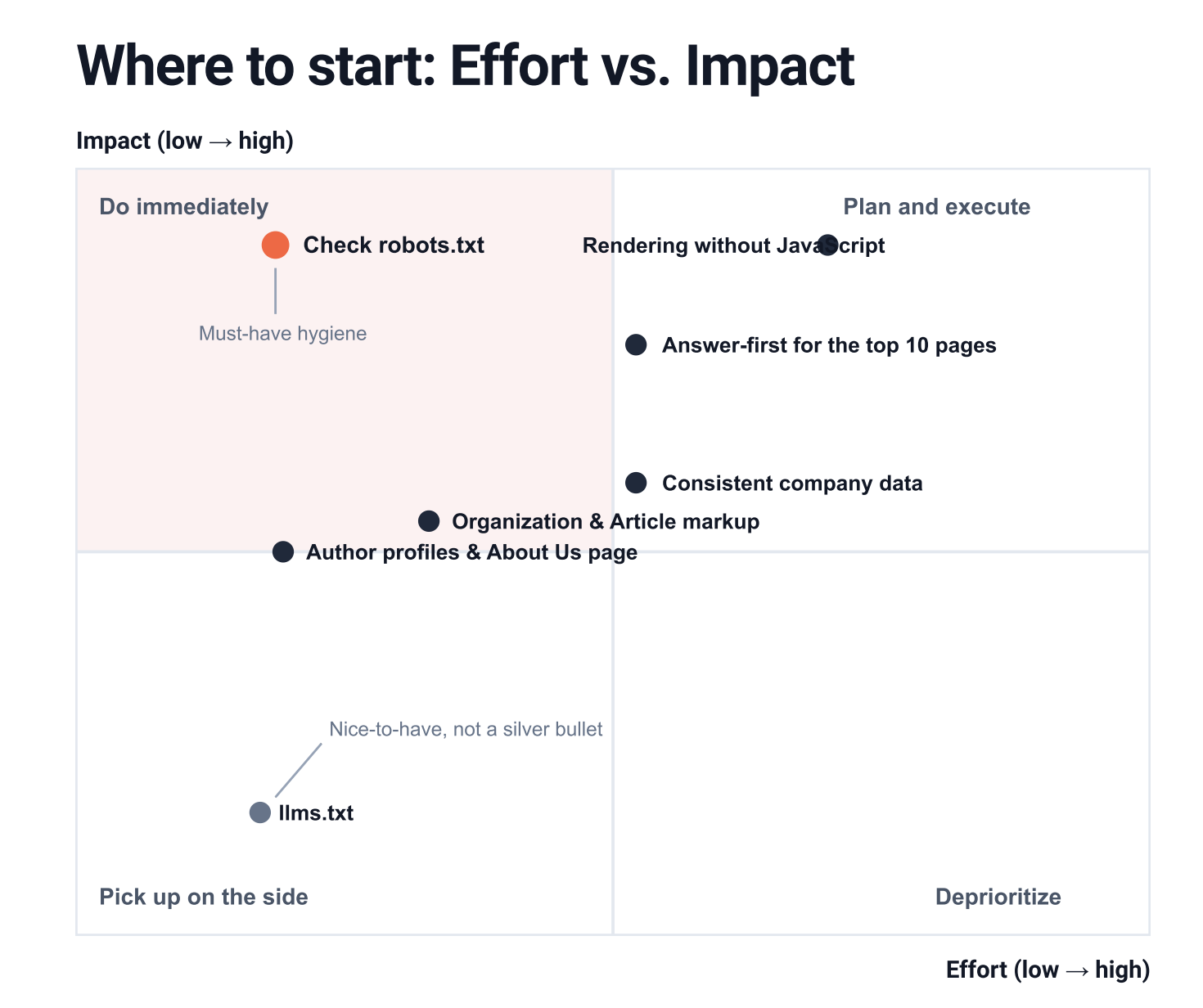
Our take: Most companies spend too much energy on whatever is currently trending and not enough on the boring basics. A misconfigured robots.txt will cost you more visibility than a perfect llms.txt could ever provide. We saw the impact of a solid technical foundation during the website relaunch for the software provider FORCAM: SEO visibility increased significantly after the relaunch. While there isn't a comparable, established metric for AI visibility yet, it starts in exactly the same place.
Checking AI visibility: The quick check
The fastest way to see if your website appears in AI responses is with a handful of test prompts and a look at your server logs. You don't need any tools for a first impression - just about an hour of your time.
Here is how to do it:
- Run test prompts. Formulate five questions the way your customers would ask them, such as "Who are the providers for [your service] in Germany?" or "What is [your brand] and who is it for?". Ask them in ChatGPT with web search enabled and in Perplexity, ideally in a temporary chat without history.
- Evaluate the answers. Note whether you are mentioned, whether your website is linked as a source, and whether the description is accurate. Also, take a look at which sources the AI uses instead.
- Check server logs. Have your IT team search the access logs for OAI-SearchBot, ChatGPT-User, Claude-SearchBot, and PerplexityBot. If these crawlers haven't appeared for weeks, something is likely blocking their access.
- Analyze referrers. Set up a filter in Google Analytics 4 for visits from chatgpt.com, perplexity.ai, and gemini.google.com. This will show you if AI responses are already driving traffic to your site.
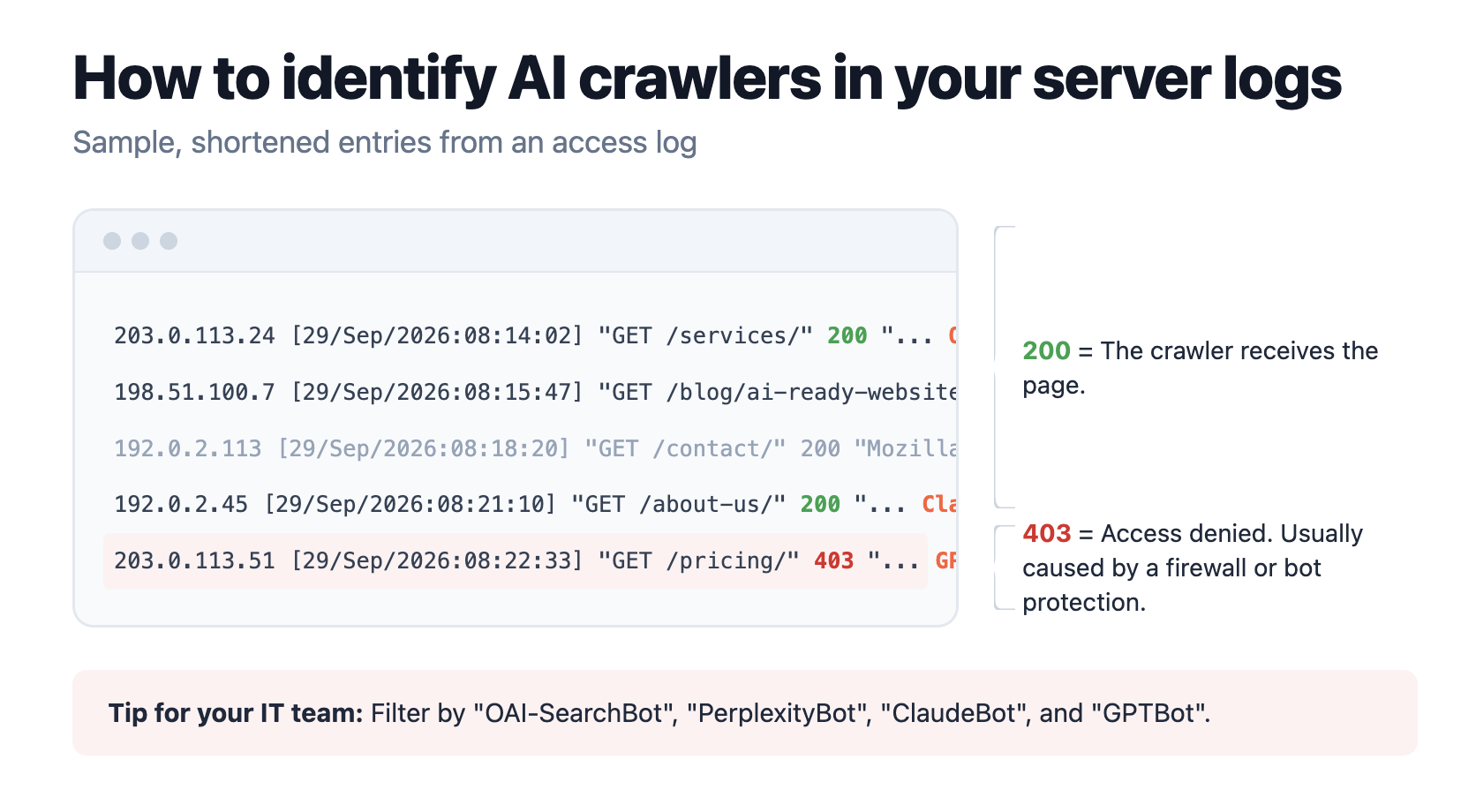
This helps you quickly identify fundamental issues. However, it’s not enough for a complete GEO audit: at Friendventure, we combine a monitoring tool like Otterly.ai with manual checks, because while tools can count mentions, they rarely notice if a description is factually incorrect. For regular monitoring across many prompts, there are specialized AI SEO tools. If you want to dive deeper in a structured way, you’ll find more checkpoints regarding technology, content, and monitoring in our GEO checklist for AI visibility .
Mistakes that make websites invisible to AI
Most websites become invisible due to individual settings that no one noticed. The trickiest one is bot protection, as it doesn't show up in any classic SEO tool. You should rule out these errors:
- Bot protection in the CDN: Content delivery networks and firewalls filter automated traffic. Cloudflare, for example, offers a setting that allows you to block AI crawlers entirely with a single click. If you enabled this at some point, you won't appear in AI responses, even if your robots.txt allows everything. We use Cloudflare in our own projects, so our advice is: check your bot settings after every site launch and major security update.
- Blanket blocks in robots.txt: A rule against GPTBot out of concern for data training is legitimate. However, OAI-SearchBot is often blocked along with it, which causes the website to disappear from ChatGPT search results.
- Core content in images or PDFs: Pricing tables as images, service descriptions only in PDF brochures, key figures in sliders. AI crawlers struggle to read these formats, if they can read them at all. Imagine a mechanical engineering firm whose performance data is only available in a PDF datasheet. If someone asks ChatGPT about systems with that exact performance, the manufacturer won't show up in the results, even though they have the perfect product.
- llms.txt as a magic bullet: Creating the file and considering the job done doesn't really change your actual visibility.
- Lack of structure: Long blocks of text without subheadings, with the most important point buried at the end. For a system that searches for specific passages, there’s nothing left that’s worth citing.
- Outdated facts: Old prices, former locations, or discontinued products on your website or in directories. AI systems pick up these details and pass them on.
Conclusion: Being AI-ready isn't a project, it's a standard
An AI-ready website is built on foundations that you maintain consistently. A one-time relaunch isn't enough. New crawlers are constantly emerging, and your content goes out of date faster than you think. If you go through the checklist twice a year, you'll stay on the safe side. It also helps to stay relaxed: AI providers only partially disclose their selection criteria, and not every fluctuation in their answers can be explained. We therefore recommend putting your energy into the fundamentals that you can control yourself.
To get started, three steps are enough: check your robots.txt and bot protection, look at the source code of your most important pages, and run five test prompts. It takes an afternoon and will show you whether you have a fundamental problem or just need some fine-tuning.
This article intentionally focuses only on the website. To learn how to prepare your team for working with AI tools, read the bakedwith post on the AI-ready team. And if you'd rather outsource the implementation, you can find an overview of GEO agencies in Germany.
FAQ
What does "AI-ready" mean for a website?
An AI-ready website is one that AI systems like ChatGPT, Perplexity, and Google AI Overviews can technically access, understand, and cite as a source. This requires open access for AI crawlers, content that doesn't rely on JavaScript, a clear structure, structured data, and a clearly recognizable brand.
How do I optimize my website for ChatGPT and other AI search engines?
First, make sure that OAI-SearchBot and other search crawlers are allowed in your robots.txt and that your content is present in the HTML source code. Then, rewrite your most important pages using an answer-first approach and add structured data according to schema.org. Regularly check the results using test prompts.
What is the difference between SEO and GEO?
SEO aims for high rankings in a list of search results. GEO aims to be mentioned and cited in the direct answers provided by AI systems. GEO builds on SEO but also requires access for AI crawlers, citeable passages, and clear entity signals.
Does every website need an llms.txt file?
No, it’s not mandatory. The file is a proposal that no major provider currently uses as a binding requirement for their search answers. We still recommend it because it’s low effort, but it should be at the bottom of your priority list.
Should I block or allow AI crawlers?
For most B2B companies, the rule is: allow search crawlers like OAI-SearchBot, Claude-SearchBot, and PerplexityBot, otherwise you won't appear in their answers. Whether you allow training crawlers like GPTBot or ClaudeBot is a conscious trade-off between reach and control over your content.
How do I find out if my website appears in AI answers?
Ask ChatGPT and Perplexity the questions your customers would ask and check if you are mentioned and linked. Additionally, server logs can show if AI crawlers are visiting your pages, and Google Analytics 4 can show if you're getting traffic from chatgpt.com or perplexity.ai.
Posted by:

Lucas Hanft is a working student at the Cologne-based digital agency Friendventure. He combines marketing expertise with storytelling to create content that ranks in both Google and AI search engines. For the past two years, he has been diving deep into Generative Engine Optimization, focusing on how to optimize the technical and content-related aspects of websites to make them easily readable for AI systems.

.webp)
.webp)

.webp)